
The Integration with VIVA Ticketing System is designed to enhance the efficiency of customer support operations by automating the data flow between the ticketing system and accounting processes. This seamless integration allows for real-time updates and minimizes the risk of manual errors, ensuring that all customer interactions are accurately recorded and accounted for.
Hinawi System will read the CSV Files from the VIVA Ticketing System daily and post them to Accounting as Journal Voucher. This process is crucial for maintaining accurate financial records and ensuring that all transactions are accounted for. The integration allows for seamless data transfer, reducing manual data entry errors. Additionally, before Posting, Users can view the Journal Voucher to ensure accuracy and make any necessary adjustments. This feature enhances transparency and helps in auditing processes.
Setup Screen: The setup screen allows administrators to configure how the integration works. Users can customize the fields that need to be imported and specify any transformations required for seamless integration.
Setup Screen

In the Setup Screen, users can customize their integration settings to fit their organizational needs. Detailed configurations allow users to specify the parameters for data import, ensuring that all relevant information from the VIVA Ticketing System is captured accurately. This step is essential for businesses that rely on precise accounting practices.
The user must tick whether to use Integration with the VIVA Ticketing System. This action triggers the integration process, allowing the system to automatically read the CSV files containing transaction data. The user must select the Folder Name where the VIVA System’s CSV file resides, ensuring that the system knows exactly where to locate the necessary information. Proper organization of files will facilitate smoother operations and reduce downtime.
Users can create or edit Revenue Types and map them to the Hinawi Chart of Accounts. This functionality allows businesses to categorize revenue streams effectively, providing deeper insights into financial performance. Additionally, users can map this Revenue type to Class and Name in Hinawi Software, enabling detailed tracking of revenue sources. Users can enter the percentage of the Amount to post to each Revenue Account, which helps in allocating revenues in a way that reflects actual business performance.
Users can create or edit Revenue Types and map them to the Hinawi Chart of Accounts, which is essential for financial reporting. Also, the User can map this Revenue type to Class and Name in Hinawi Software, providing a more structured approach to categorizing income. This feature allows for flexibility in financial management. Additionally, the User can enter the percentage of the Amount to post to each Revenue Account, enabling precise allocation of funds across various accounts, which is vital for understanding financial performance.
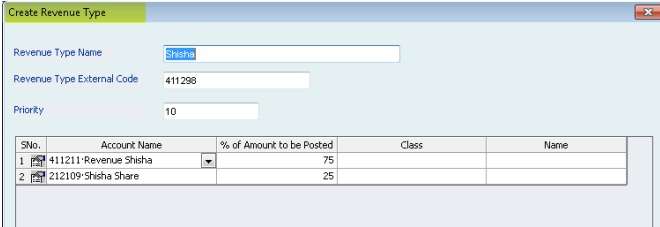
Understanding the importance of accurate revenue tracking can significantly impact business decisions. By analyzing these categorized revenues, companies can identify which services are most profitable and adjust their strategies accordingly.
This functionality is crucial for users who need to manage large volumes of transaction data efficiently. By allowing the system to import data directly from CSV files, users can save time and minimize errors compared to manual entry. Such automation is a significant advantage for businesses looking to enhance productivity.
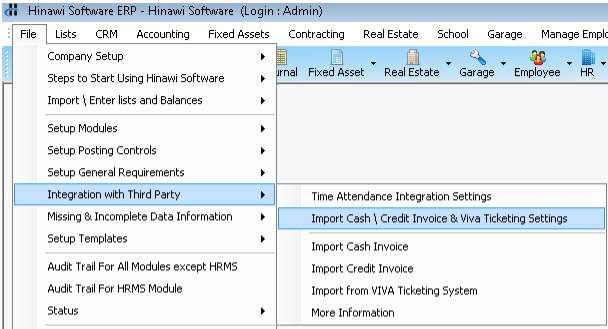
Users can select the CSV file and view the Journal Voucher (JV) before posting to Accounting. This step is crucial as it allows users to ensure that the data reflects their intended entries. They can easily spot errors or omissions, which can save a lot of time and resources in the long run.
Reading the Data from the CSV: The system will parse the CSV file, extracting relevant data such as transaction dates, amounts, and descriptions. This automated process minimizes human intervention, which can often lead to mistakes.
Users can select the CSV file and view the Journal Voucher (JV) before posting to Accounting. This stage acts as a final checkpoint, ensuring that all imported data is accurate and ready for processing. By reviewing the Journal Voucher, users can make adjustments, if necessary, thereby preventing potential issues in accounting records. This careful review process underscores the importance of accuracy in financial reporting.
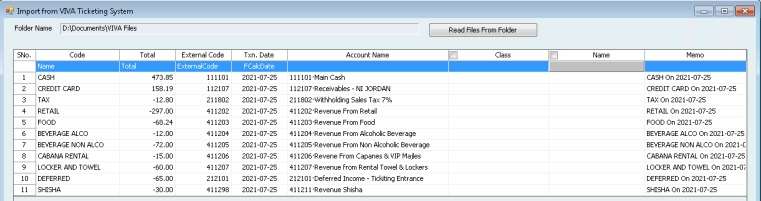
The system will read the corresponding Accounts from the Integration Settings and create the Journal Voucher as shown below. This automatic generation of the Journal Voucher streamlines accounting processes, allowing for quick updates to financial records. Once we post to the Accounting CSV file, it will be removed from the List, ensuring that users only see relevant, unprocessed files. This feature helps maintain an organized workflow.
Once we post to the Accounting CSV file, it will be removed from the List, ensuring that users do not accidentally post the same data multiple times, which can lead to complications in financial records.

Furthermore, this integration supports reporting and analytics that can provide insights into customer support trends. By analyzing data over time, businesses can identify common issues, peak support times, and customer satisfaction levels, allowing them to enhance service delivery continually.
For further assistance or inquiries about the Integration with VIVA Ticketing System, users can contact our support team. Our dedicated professionals are available to provide guidance, ensuring that you maximize the benefits of this integration. Whether you need help with setup, troubleshooting, or optimization, we are here to help.
Implementing an effective Integration with VIVA Ticketing System not only simplifies your accounting processes but also improves customer satisfaction. By ensuring that customer inquiries and transactions are accurately tracked and reported, businesses can respond more quickly to customer needs and maintain a higher level of service quality.